Customer Support Agent
This example walks through a realistic enterprise support pipeline: multiple agents share a session, commit text and product photos to memory, and retrieve context across tickets using both metadata filters and CLIP semantic image search.

What This Example Shows
- Multi-agent sessions: a senior agent and an AI triage agent each hold
their own
Contextinto the same support ticket session - Multimodal commits: text notes and product photos committed together via
process_and_commit()so both are searchable - Graph connectivity: every commit creates a
NexusCommitentity linked to its context, user, and content; the knowledge graph is built automatically - CLIP semantic image search: a text query ("scratched product") retrieves the most visually similar damage photos across all tickets
The schema below shows the graph aperture-nexus builds in ApertureDB as entries are committed:
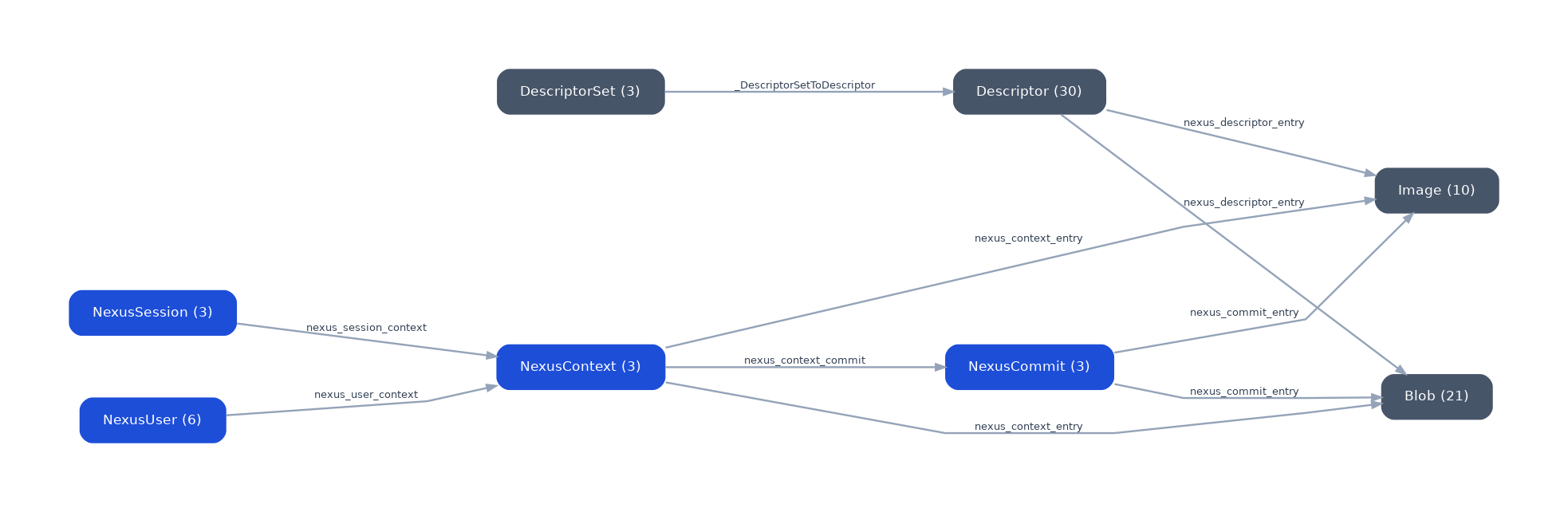
Each NexusUser is connected to the NexusContext they authored. Each
NexusContext is connected to its NexusCommit (for precise removal) and
directly to every content entry (blob, image) for fast traversal. All edges
are created atomically with the content; there is no separate graph-building
step.
Setup
import os
from aperture_nexus import Memory, Context, Information, NexusAdmin, generate_session_id

# Connect to local Docker stack (docker compose up -d)
if not os.environ.get("APERTUREDB_KEY"):
    os.environ["APERTUREDB_JSON"] = (
        '{"host":"localhost","port":55556,'
        '"username":"admin","password":"admin","use_ssl":false}'
    )

admin  = NexusAdmin()
memory = Memory()
Provision Principals
Each participant (human agents, AI triage bot) gets their own Principal. The admin creates them once; principals authenticate with an API key.
ORG  = "acme-corp"
DEPT = "support"

def create_principal(user_id, user_name):
    return admin.create_principal(
        user_id=user_id,
        user_name=user_name,
        organization=ORG,
        department=DEPT,
    )

alice_key = create_principal("alice-support", "Alice Chen")
ai_key    = create_principal("ai-triage",     "AI Triage Agent")

alice = memory.authenticate(user_id="alice-support", api_key=alice_key)
ai    = memory.authenticate(user_id="ai-triage",     api_key=ai_key)
Open a Shared Support Ticket Session
A single session ID is shared across all participants. Each participant
opens their own Context into that session, which becomes a node in
the knowledge graph connected to their user entity.
sid = generate_session_id(prefix="ticket")

ctx_alice = Context(
    principal=alice,
    session_id=sid,
    purpose="Surface scratch — SkyDock Pro lid — pre-shipping",
    organization=ORG,
)

ctx_ai = Context(
    principal=ai,
    session_id=sid,
    purpose="AI triage — SkyDock Pro defect analysis",
    organization=ORG,
)
Agent 1: Alice Logs the Customer Report
Alice's context buffers text notes and product photos locally. Nothing
touches ApertureDB until process_and_commit() is called.
info_alice = Information(context_id=ctx_alice.id)

info_alice.log(text="Customer received SkyDock Pro with a diagonal scratch across the full lid.")
info_alice.log(text="Unit was new in sealed original box. Damage is pre-shipping.")
info_alice.log(
    text="Photo attached — scratch visible running lid end to end.",
    image=scratch_photo_bytes,   # PIL Image, numpy array, path, or bytes
)

commit_id = memory.process_and_commit(ctx_alice, info_alice)
print(f"Alice committed  ·  commit_id: {commit_id[:16]}…")
process_and_commit() generates CLIP embeddings for the image and text embeddings
for the notes, then writes everything to ApertureDB in one atomic operation per
entry. The graph looks like this after Alice's commit:
NexusUser(alice) ──nexus_user_context──► NexusContext(ctx_alice)
                                               │
                               nexus_context_commit ──► NexusCommit(commit_id)
                                               │                  │
                               nexus_context_entry        nexus_commit_entry
                                               │                  │
                                               └──────────────────┘
                                                        ▼
                                               Image + Blob (text chunk)
Agent 2: AI Triage Adds Its Analysis
The AI triage agent commits to the same session but its own context, so its contribution is attributed separately in the graph.
info_ai = Information(context_id=ctx_ai.id)

info_ai.log(text="Scratch pattern consistent with conveyor belt contact. Not a customer-caused defect.")
info_ai.log(text="Recommend: replacement unit + escalate to QA for batch review.")

memory.process_and_commit(ctx_ai, info_ai)
print("AI triage committed")
Retrieve the Full Ticket
Searching by session_id returns all contributions from all participants
in that session, regardless of which context they came from.
results = memory.search(filters={"session_id": sid})

for r in results:
    print(f"[{r.modality}]  {r.user_id}:  {r.text or '(image)'}")
[text]   alice-support:  Customer received SkyDock Pro with a diagonal scratch…
[text]   alice-support:  Unit was new in sealed original box…
[image]  alice-support:  (image)
[text]   ai-triage:      Scratch pattern consistent with conveyor belt contact…
[text]   ai-triage:      Recommend: replacement unit + escalate to QA…
Semantic Image Search Across Tickets
With CLIP embeddings indexed, a text query can retrieve visually similar damage photos across all sessions, not just the current ticket.
# Find the most visually similar damage photos to this text description
results = memory.search(
    query="scratched product surface damage",
    modality="image",
    k=5,
)

for r in results:
    print(f"score: {r.score:.3f}  session: {r.session_id}  user: {r.user_id}")
This returns photos from any session where process_and_commit() was called
(scratch, flaking, discoloration, or crack damage), ranked by visual similarity
to the query text. A text query can find image results; an image query can
find similar images in other sessions.
Search by Purpose
search_contexts() finds sessions by the intent behind them, useful when you
want to surface related tickets without knowing their session IDs.
related = memory.search_contexts(
    "surface damage pre-shipping",
    filters={"organization": ORG},
    k=5,
)

for r in related:
    print(f"score: {r.score:.3f}  session: {r.session_id}  purpose: {r.purpose}")
Clean Up
memory.remove(session_id=sid)
admin.delete_principal(user_id="alice-support")
admin.delete_principal(user_id="ai-triage")
remove(session_id=sid) deletes all blobs, images, text chunks, descriptors,
NexusCommit, NexusContext, and NexusSession entities for the session in
one call.
Key Patterns
| Pattern | How it works |
|---|---|
| Multi-agent on one ticket | Shared session_id, separate Context per participant |
| Attribution | Every entry is linked to its context and its user in the graph |
| Precise rollback | commit_id returned by process_and_commit(); pass to remove(commit_id=...) to undo exactly one commit |
| Fast context search | Direct NexusContext → entry edges bypass NexusCommit for traversal |
| Semantic image retrieval | CLIP embeddings indexed at commit time; text or image queries at search time |
| Organization scope | Set organization= on Context to filter results to one tenant |
Full Runnable Example
The full script, with seeded org knowledge across three agents, damage photo
generation, and the live CLIP demo, is in
demo/customer_support_demo.py.
Run it against a local Docker stack: