Ask the Codebase: an interactive demo app
A web app that ingests a git repo into Nexus and lets you query it
three ways: semantic chat, scoped filtering, and graph-walked lineage.
The example repo in the demo is aperture-nexus itself, but python
demo/webapp/ingest.py --repo /path/to/other/repo works on any git
repo on disk.
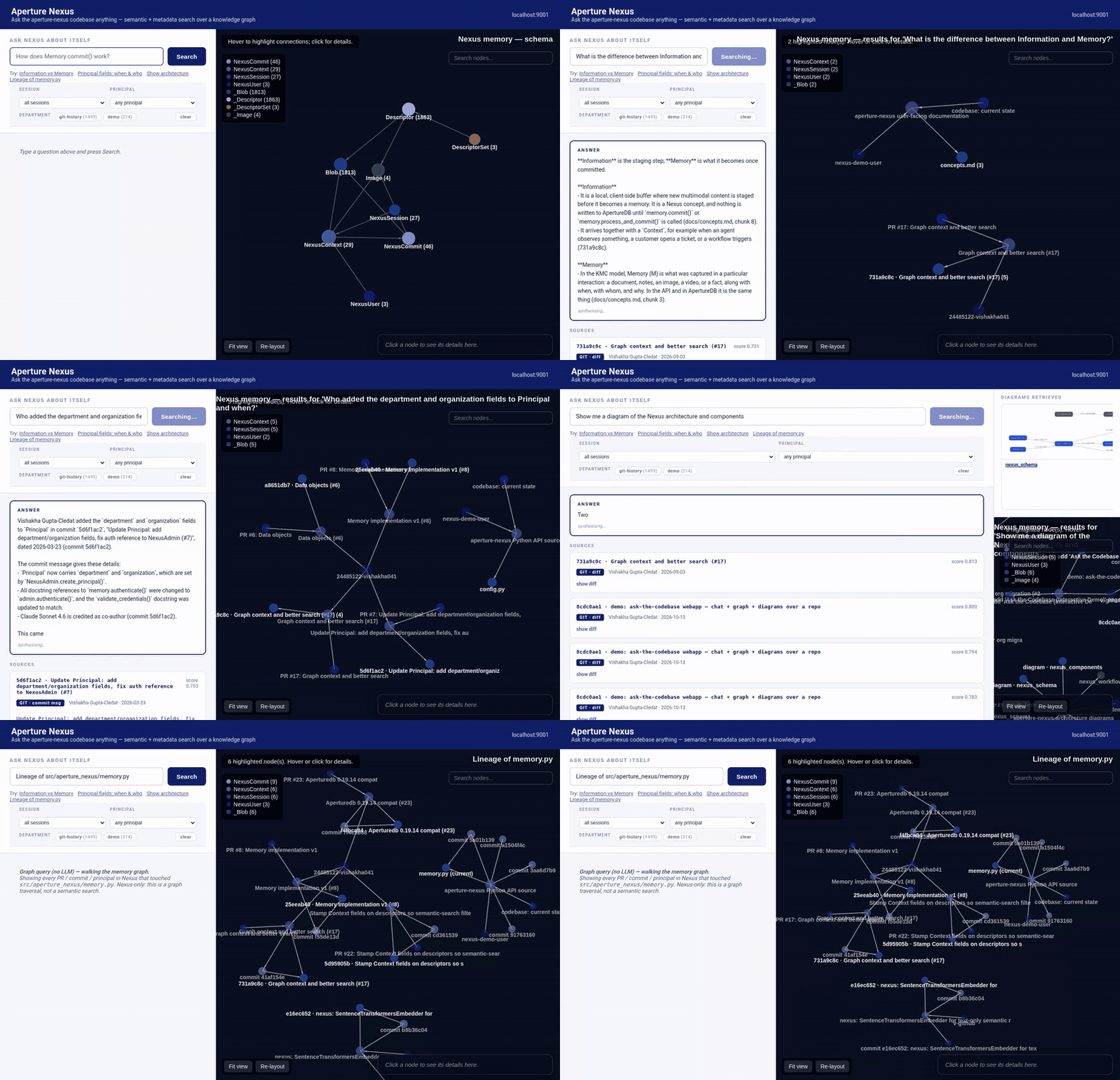
The three retrieval shapes:
| Retrieval shape | What the UI does | |
|---|---|---|
| Semantic | Memory.search(query, filters) |
Natural-language question → ranked chunks → Claude-synthesised answer with citations |
| Scoped | Memory.search(filters={"session_name": ..., "user_id": ..., "department": ...}) |
Dropdowns + chips above the chat narrow by PR, principal, or collection — live counts fed by /counts |
| Lineage | ApertureDB graph traversal (_Blob → nexus_commit_entry → NexusCommit → nexus_context_commit → NexusContext) |
"Lineage of memory.py" chip walks the graph to surface every PR / commit / principal that ever touched a file |
Live locally at http://localhost:9001 once ApertureDB is up, the
three ingest scripts have run, and the server is started.
How this is different from "Coding Assistant with Continuity"
Coding Assistant with Continuity is a scripted
API walkthrough: three sessions over multiple days, showing how
Context.purpose and session_name keep an agent coherent across time.
It's about the agent remembering itself.
Ask the Codebase is a running UI over a committed memory: it assumes someone has already ingested the repo (files, git history, diagrams) into Nexus and now provides a chat interface for anyone to query it. It's about an agent — or a human — remembering a project.
The two are complementary. Coding Assistant shows the API primitives in code. Ask the Codebase shows what you can build on top of them when the memory already exists.
What's ingested
The demo uses the aperture-nexus repo itself as a worked example — Nexus
remembering Nexus. Three ingest scripts populate a single Nexus session
(aperture-nexus-codebase) with three kinds of memory, all searchable
together:
| Script | What it loads | Nexus shape |
|---|---|---|
ingest.py |
Core source + user-facing docs, chunked ~1200 chars | 1 Principal, 3 Contexts (root/src/docs), 17 Commits, ~310 Blobs |
ingest_git.py |
Full git log --patch for the repo |
2 Principals (both of Vishakha's email addresses), 21 Contexts (one per git commit, with the commit subject as purpose), 21 Commits, ~1320 Blobs |
ingest_images.py |
The four architecture diagrams, each as a paired caption + image | 1 Context, 4 image Entries + 4 caption Blobs |
Everything shares the same session_name so a single Memory.search()
query sees all of it. The graph on the right shows how the pieces
connect — a question that touches the architecture surfaces the diagram
entity and the context it lives in and the session that groups it
with the codebase.
What makes the answers good
Three choices in the stack matter:
- A real text embedding model. The demo configures
BAAI/bge-small-en-v1.5through Nexus's newSentenceTransformersEmbedder. CLIP's text tower — Nexus's prior default — was trained on image-caption pairs and ranks the same few diff-heavy chunks for every query. BGE-small ranks the exact target commit for specific-attribution questions like "who added the department and organization fields to Principal and when?" at position 1 with a clear score separation. - Rich metadata on every chunk. The ingest scripts stamp
file_path,folder,commit_sha,author,commit_date,commit_subject,figure_idwhere applicable — the webapp passes that metadata to the LLM alongside the chunk text, so Claude can answer "when was X introduced" correctly rather than only "what is X". - Streaming synthesis + a graph that updates. Sources arrive from
Memory.search()in ~200 ms; the LLM streams its answer token by token into the chat panel; the graph iframe reloads in parallel. The experience feels like ~500 ms instead of the 2–4 s a buffered LLM response takes.
Running it locally
The full setup — environment, ApertureDB, ingest, LLM key, server
start — lives in demo/webapp/README.md.
Short version:
- ApertureDB. Community in Docker (
docker compose up -dfrom the repo root), or pointAPERTUREDB_KEY/APERTUREDB_JSONat an ApertureDB Cloud / VPC endpoint — the webapp works identically. - Install.
pip install -e ".[sentence-transformers,clip,ui]"plusanthropicfor the synthesised-answer panel (optional). - Ingest. Three scripts, each independent and each accepting
--repo /path/to/any/repofor a different codebase: - Run.
uvicorn demo.webapp.app:app --port 9001 --host 0.0.0.0, openhttp://localhost:9001.
Architecture
- Backend (
app.py) is a thin FastAPI wrapper around a single long-livedMemoryinstance plus an Anthropic client: POST /search— fast path, returns ranked chunks onlyGET /synthesize— SSE stream:sourcesevent (chunks), thenchunkevents (streamed LLM text), thendoneGET /graph/query?q=…— same search, rendered as a graph seeded on matching Blobs and expanded upward through Commits → Contexts → Sessions → UsersGET /graph/lineage?file=…— walksgit log --followplus the Nexus graph to show every PR that ever touched the fileGET /counts— live Blob counts per Session, Principal, Department; powers the filter chip labelsGET /figure/{id}— serves a named architecture diagram- Frontend (
templates/index.html) is vanilla JS. On every search: calls/countsto refresh the filter chips, opens an SSE stream for the synthesised answer, and reloads the graph iframe once sources arrive. - Graph viz (
graph_viz.py) is a reusable, schema-agnostic ApertureDB → interactive HTML tool: inspect any workspace withGetSchema, pass its result throughrender_schema/render_query/render_graph, get back areact-force-graphpage with the node's hero media (image, video, blob preview) inlined into the details panel. Drop it into any ApertureDB app you build.
Diagram retrieval is a paired-logging trick: each diagram is logged twice — once as a text caption (BGE-indexed, text-searchable) and once as the image bytes (CLIP-indexed, usable later for image-to-image queries). When a caption surfaces for a text query, the UI pulls up the paired image from Nexus and renders it inline. Caption and image sit in a dedicated "architecture diagrams" session, so a graph query also reveals the full set of diagrams Nexus knows about.
How we built it
The whole demo rests on five Nexus API calls. The full source is in
demo/webapp/;
the snippets below strip the error-handling and logging so you can see
just the Nexus shape.
1. Ingesting a file
For each file we create one Information buffer under a Context
keyed to the folder, log the chunks, then commit — one commit per file.
process_and_commit runs the configured text embedding model
(sentence-transformers in this demo) and writes a Blob + Descriptor
per chunk, all linked back to the Context.
from aperture_nexus import Context, Information, Memory, NexusAdmin

memory = Memory()
memory._cfg.models.text_embedding = "BAAI/bge-small-en-v1.5"
principal = memory.authenticate(user_id="nexus-demo-user", api_key=api_key)

ctx = Context(
    principal=principal,
    session_name="aperture-nexus-codebase",
    purpose="aperture-nexus Python API source",
    organization="nexus-demo",
    department="src",
)

info = Information(context_id=ctx.id)
for idx, chunk in enumerate(_chunk_text(file_text, size=1200, overlap=150)):
    info.log(
        text=chunk,
        metadata={
            "file_path": "src/aperture_nexus/memory.py",
            "folder": "src",
            "chunk_idx": idx,
        },
        tag="src/aperture_nexus/memory.py",
    )

memory.process_and_commit(ctx, info)
Everything on that metadata dict lands on the stored Blob and on
its Descriptor, so later searches can filter by file_path, folder,
or any custom key you add — no re-ingest needed.
2. Ingesting a git commit (author becomes a Principal)
The git-history ingest treats each commit's author as a distinct
Principal. The commit subject becomes Context.purpose, so each commit
shows up as its own NexusContext node in the graph with a readable
label. The commit date flows through created_at on every entry
automatically.
# Each author becomes a Principal — provision once, cache the API key.
pid = _principal_name(commit["author_name"], commit["author_email"])
if pid not in principals:
    api_key = admin.create_principal(
        user_id=pid, user_name=commit["author_name"],
        organization="nexus-demo", department="git-history",
    )
    principals[pid] = memory.authenticate(user_id=pid, api_key=api_key)
principal = principals[pid]

# One Context per commit — purpose = commit subject.
ctx = Context(
    principal=principal,
    session_name="aperture-nexus-codebase",   # shared with the file ingest
    purpose=commit["subject"][:200],
    organization="nexus-demo",
    department="git-history",
)

info = Information(context_id=ctx.id)
# Entry 1: the commit message itself
info.log(text=commit["message"], metadata={
    "commit_sha": commit["sha"], "author": commit["author_name"],
    "commit_date": commit["date"], "kind": "commit_message",
})
# Entry 2+: the diff, chunked
for chunk in _chunk_text(commit["diff"]):
    info.log(text=chunk, metadata={
        "commit_sha": commit["sha"], "commit_subject": commit["subject"],
        "author": commit["author_name"], "commit_date": commit["date"],
        "kind": "diff",
    })

memory.process_and_commit(ctx, info)
Note the shared session_name with the file ingest — a single
Memory.search sees both.
3. Ingesting a diagram (paired caption + image)
Each architecture diagram is logged twice: a text caption (BGE-indexed,
findable by natural-language questions like "show me the architecture")
and the image bytes themselves (CLIP-indexed, usable for image-to-image
queries). Both carry the same figure_id metadata so the UI can pair
them for display.
memory._cfg.models.image_embedding = "ViT-B/16"   # CLIP for the pixels

ctx = Context(
    principal=principal,
    session_name="aperture-nexus-codebase",
    purpose="aperture-nexus architecture diagrams",
    organization="nexus-demo", department="diagrams",
)

info = Information(context_id=ctx.id)
info.log(
    text="Diagram: Nexus write and query workflow. WRITE path: ...",
    metadata={"kind": "diagram_caption", "figure_id": "nexus_workflow"},
    tag="diagram:nexus_workflow",
)
info.log(
    image="docs/nexus_workflow.png",
    metadata={"kind": "diagram_image", "figure_id": "nexus_workflow"},
    tag="diagram:nexus_workflow",
)
memory.process_and_commit(ctx, info)
4. Searching across all three (files + commits + diagrams)
The webapp's /search endpoint is one Memory.search() call, filtered
to the demo session. The embedding model is picked up from
memory._cfg.models.text_embedding — no need to specify it per call.
results = memory.search(
    query="Who added the department and organization fields to Principal and when?",
    modality="text",
    filters={
        "session_name": "aperture-nexus-codebase",
        "organization":  "nexus-demo",
    },
    k=8,
)

for r in results:
    meta = r.metadata or {}
    kind = meta.get("kind")   # 'diff', 'commit_message', 'diagram_caption', or None (file)
    print(f"{r.score:.3f}  {kind or 'file':16s}  "
          f"{meta.get('file_path') or meta.get('commit_short') or meta.get('figure_id')}")
    print(f"  {r.text[:120]}...")
Returns a flat list ranked by cosine similarity. Each SearchResult
carries the chunk's text, score, context_id, session_id, user_id,
created_at, and any custom metadata you stamped at log time —
everything the LLM needs to cite its sources.
5. Feeding the LLM
The webapp's /synthesize endpoint hands the top-k chunks to Claude
with a tight system prompt. Streaming the response via SSE drops
perceived latency from ~3 s to ~500 ms:
with anthropic_client.messages.stream(
    model="claude-sonnet-5-5",
    max_tokens=1000,
    system="You are an expert on aperture-nexus… [full prompt in app.py] …",
    messages=[{"role": "user", "content": prompt_with_chunks}],
) as stream:
    for text in stream.text_stream:
        yield f"event: chunk\ndata: {json.dumps({'text': text})}\n\n"
That's the whole stack — ~250 lines of application code around the Nexus primitives.
Adding a new session or principal
The whole demo workspace — three principals, 25+ sessions, 100-ish commits, 1,800+ chunks — was built from the same four API calls repeated in a loop. Adding a fourth principal or a new session later takes the same two steps you'd use for the first:
New principal. Run once at setup; stores the user record and returns their API key:
from aperture_nexus import NexusAdmin

admin = NexusAdmin()
api_key = admin.create_principal(
    user_id="bob",
    user_name="Bob Builder",
    organization="nexus-demo",
    department="eng",
)
# Deliver api_key to Bob out-of-band. Nexus never stores the plaintext.
New session. Just name one — it materialises on the first commit that references it. No separate "create session" call:
from aperture_nexus import Context, Information, Memory

memory = Memory()
bob = memory.authenticate(user_id="bob", api_key=api_key)

ctx = Context(
    principal=bob,
    session_name="investigation: memory-leak-in-commit",   # new session
    purpose="Reproducing the leak reported in #117",
    organization="nexus-demo",
)
info = Information(context_id=ctx.id)
info.log(text="Reproduced with 10k consecutive commits; heap grows ~2 MB/commit")
info.log(image="profiles/heap-10k.png")
memory.commit(ctx, info)
That's it. Bob now appears in the Principal filter dropdown of this
demo UI, and the new session appears in the Session dropdown with its
chunk count — no code change, no restart, the next page refresh picks
them up from the /counts endpoint.
The same pattern scales to every "episode" worth remembering: one customer ticket is a session, one PR is a session, one coding sprint is a session, one incident post-mortem is a session. Nexus stamps the session on every chunk so later searches can scope precisely without needing a separate index per episode.
Try it on your own repo
Both ingest scripts take a --repo argument:
python demo/webapp/ingest.py       --repo /path/to/your/project
python demo/webapp/ingest_git.py   --repo /path/to/your/project
Without flags they default to this aperture-nexus checkout. Diagrams
(ingest_images.py) are specific to our architecture; omit for other
repos.
A hosted version where visitors paste a public GitHub URL and chat with that repo is on the roadmap. The open design question is how to isolate per-visitor workspaces inside a shared ApertureDB Cloud instance without duplicating the DB per user.