Concepts
aperture-nexus is the cognition engine for enterprise AI. It is built around the KMC model: three concepts that together let a system remember, retrieve, and reason continuously, the way real teams work.
- Knowledge (K): the general facts and relationships that don't change moment to moment, such as catalogs, policies, historical records, and past decisions. A shared baseline held in ApertureDB, extended or refreshed from external sources over time.
- Memory (M): what was captured in a particular interaction:
a document, notes, an image, or any information committed via
Nexus, along with when, with whom, and why. Just like human
memory, it can be any kind of content, not a step-by-step log.
Each memory is durable and carries its own graph connections.
Memory(the Python class) is that store and its interface, andmemory.commit(ctx, info)adds a new one. - Context (C): the who, what, when, why, and how that makes a fact meaningful rather than merely retrievable. Stamped on every memory so retrieval can be scoped precisely.
The Cognition Stack
The KMC concepts sit inside a layered architecture: ApertureDB provides the storage and query substrate, Nexus organizes Knowledge, Memory, and Context on top of it, and the reasoning layer above uses that substrate to think, decide, and act.
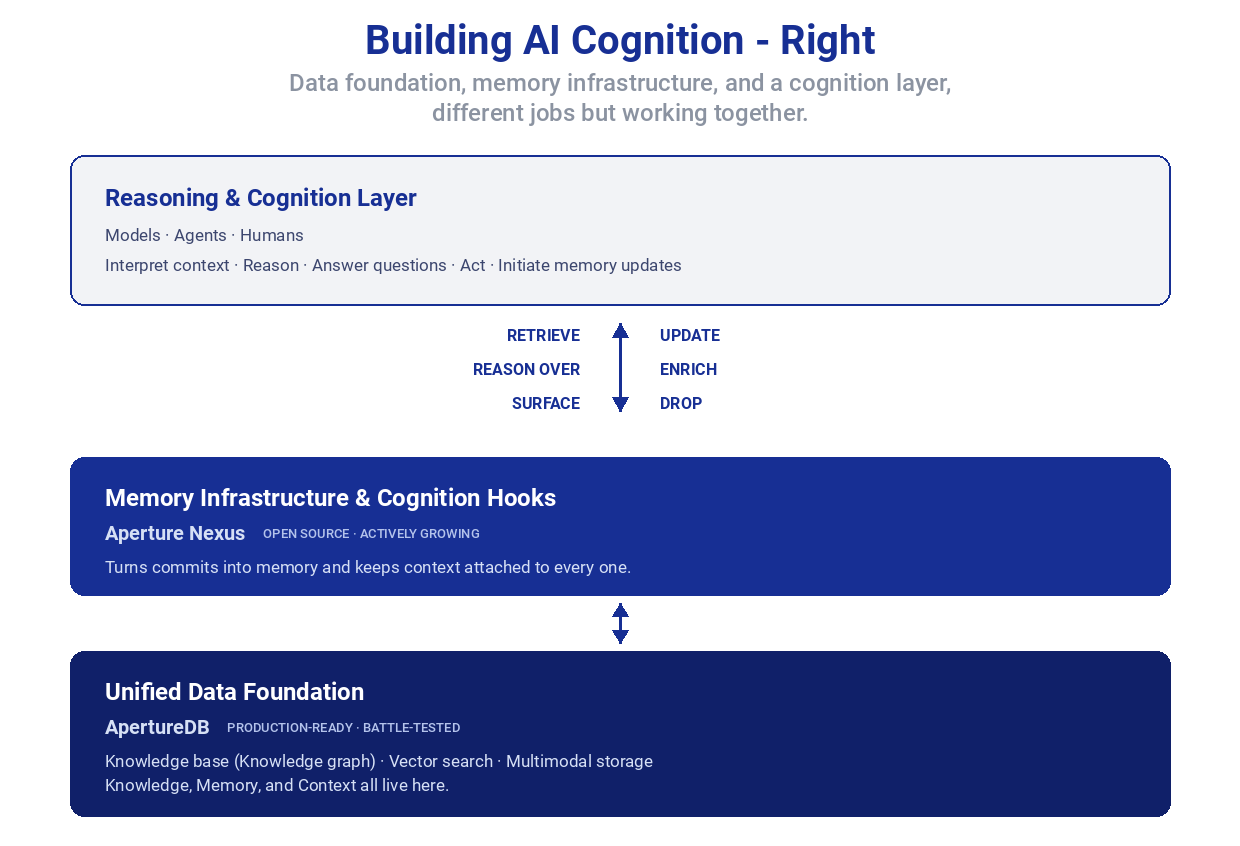
For a longer treatment see Introducing Aperture Nexus: Multimodal Memory and AI Memory & Cognition: The Architect's Playbook.
The KMC Loop
KMC is not three static buckets. It runs as a loop:
- New
Informationarrives with aContext(an agent observes, a customer opens a ticket, a workflow triggers). - Committing turns Information into a
Memoryin ApertureDB, with Context stamped on it and graph connections in place. - When the next question comes in, its Context frames a search across Memory and Knowledge together, pulling only what is relevant to the situation.
- The results are reasoned over and acted on (by an agent, a human, or a domain-specific layer), often producing new Information such as a response, a decision, or an updated fact.
- That new Information becomes new Memory. Some memories eventually harden into Knowledge; others get discarded as they age or turn out to be wrong. The loop continues.
Cognition is what this loop enables. Not just storage, not just retrieval: the ability to accumulate experience, connect it to shared facts, notice contradictions, surface what an agent is actually relying on, and update or discard beliefs as new evidence arrives. The cognition hooks (surface, update, enrich, discard) are where a domain-specific layer or a human intervenes to keep the loop honest. Nexus provides the substrate; the judgment layer sits above.
The Python API objects mirror the KMC concepts directly. Information
is the local Nexus buffer where new content is staged before it
becomes a memory; Memory is the persistent store and its interface
(the only component that reads or writes ApertureDB); Context is
the frame Nexus stamps on every commit. This page explains what
each represents, how they relate, and how they map to ApertureDB's
storage primitives.
Parallel to human memory: a useful mnemonic, not the product. Knowledge is akin to durable general knowledge, Memory to specific recallable experiences, and a short-term / working memory layer (search, dedup, consolidate before commit) is on the v2 roadmap.
The Three Core Objects
Information: The Staging Buffer
Information is a local, client-side buffer where new multimodal
content is staged before it becomes a memory. It is a Nexus concept:
nothing is written to ApertureDB until memory.commit() or
memory.process_and_commit() is called. On commit, the buffered
entries become memories stored in the graph alongside the baseline
Knowledge and searched together with it.
Inputs are added via Information.log(), which validates and
normalizes each entry immediately, so errors surface at log time, not
during commit.
You can commit incrementally during a long session rather than
buffering everything until the end. Each memory.commit(ctx, info)
call flushes the current buffer and returns; you can continue logging
to the same info object and commit again later. If a commit fails,
the buffer is preserved so you can retry without losing entries.
Supported input types:
| Modality | Accepted forms |
|---|---|
| Text | str |
| Image | file path, URL, bytes, PIL Image, numpy.ndarray |
| Video | file path, URL, bytes |
| Blob | file path, URL, bytes; requires document_type (e.g. "pdf", "mp3", "docx") |
| Embedding | numpy.ndarray + embedding_model (skips model call) |
Note that image and video accept paths and URLs (content is read
at commit time), while blob also accepts a file path as a
convenience. If you want to store a reference only (e.g. a URL you
don't want fetched), use text or a custom metadata field.
Blobs are stored opaquely in v1. Nexus does not extract text from documents (pdf, docx, csv, etc.) and does not embed blob content on its own. Calling
process_and_commit()on a blob-only entry raisesNexusConfigError. To make a document semantically searchable, either extract the text upstream and log it with the blob (info.log(text=..., blob=..., document_type=...)), pre-compute an embedding and pass it in (info.log(blob=..., embedding=..., embedding_model=...)), or usememory.commit()for opaque storage searchable by metadata only. Native document extraction is planned for a future release.
Memory: The Accumulated Layer
Memory is the M in KMC: what was captured in a particular
interaction, meaning any information committed via Nexus (a document,
notes, an image, a video, a fact) along with when, with whom, and
why. In the API and in ApertureDB it is the same thing.
New Information becomes a memory when committed; each memory is
durable and carries its own graph connections to the NexusContext
that authored it and the NexusCommit it was part of. Memories
accumulate over time and are searched together with Knowledge.
Memory (the Python class) is the interface to this store and the
only component that reads or writes ApertureDB. Every other object
in the API is a pure data object. Through this one interface you:
- Authenticate principals
- Commit new memories (
memory.commit(),memory.process_and_commit()) - Link contexts to one another with user-defined named relationships
(
memory.connect(); the underlyingnexus_linkedge is Context to Context in v1) - Search across memories and Knowledge with permission enforcement
Context: The Retrieval Frame
A Context captures who, what, when, why, and how: the C in KMC.
It is a pure data object; it never writes to ApertureDB. Nexus stamps
every commit with its Context properties so retrieval can be scoped
to the right participants, sessions, and purposes, turning raw
storage into meaningful cognition.
Key properties:
principal: the authenticated user or agent performing this actionsession_id/session_name: which session this context belongs topurpose: the task or intent behind this interaction, expressed as a short phrase (e.g."debug failing export","Q3 budget review","customer support ticket #4821"). Stored as metadata and filterable at search time.organization: optional group scope for permission and search filteringrestrictions: optional local or global constraints that affect what this context can read and write
Why purpose matters: it is the signal that lets Memory retrieve
knowledge in the right context. search(filters={"purpose":
"customer support"}) returns only entries where that purpose was set;
without it, results are scoped only by session or organization.
Think of it as tagging every log entry with the task it was part of.
How the Three Objects Relate
flowchart LR
    C["Context (C)\nwho · what · when · why · how"]
    I["Information\nlocal Nexus buffer"]
    M["Memory (M)\nin ApertureDB, with connections"]
    K["Knowledge (K)\nshared baseline in ApertureDB"]
    R["Reason / respond\n(agent · human · domain layer)"]

    I -->|"commit()"| M
    C -->|"stamps every memory"| M
    C -->|"scopes"| R
    M --> R
    K --> R
    R -->|"new Information"| I
    R -.->|"cognition hooks:\nsurface · update · enrich · discard"| M
    R -.->|"consolidate over time"| K
The solid edges are v1 behavior. The dashed edges are the cognition
hooks: today they run via explicit memory.commit() and
memory.remove() calls made by the reasoning layer; automatic
consolidation and decay are on the roadmap.
Processing Flow
Information.log() accepts raw inputs and validates them locally.
The call to memory.commit() decides how they are stored.
flowchart LR
    L["info.log(text, image, video, blob)"]
    B["Information buffer\n(local, no DB)"]
    R{"commit strategy"}
    Raw["memory.commit()\nraw storage — fast\nno model calls"]
    Proc["memory.process_and_commit()\nembeddings + summarization\nmodel calls"]
    Async["memory.async_process_and_commit()\nreturns MemoryTask immediately\nnon-blocking"]
    DB["ApertureDB"]
    Search["memory.search()"]

    L --> B
    B --> R
    R --> Raw
    R --> Proc
    R --> Async
    Raw --> DB
    Proc --> DB
    Async -->|"background"| DB
    DB --> Search
Use commit() when you need speed and will rely on metadata-only
search. Use process_and_commit() when you need semantic (vector)
search across the stored content.
Clearing and Updating the Buffer
Before committing, you can clean up the Information buffer. All removal methods affect only the local buffer; nothing is written to or deleted from ApertureDB.
By reference: log() returns an InformationEntry. Hold it and pass it back to remove():
draft = info.log(text="preliminary draft")
info.log(text="final version")
info.remove(draft)       # discard the draft; only "final version" commits
memory.commit(ctx, info)
By tag: label a group of related entries at log time, then discard the whole group:
info.log(text="Order #4412 placed", tag="order-4412")
info.log(blob=receipt, document_type="pdf", tag="order-4412")
if order_cancelled:
    info.remove_tagged("order-4412")   # both entries removed atomically
By timestamp, two patterns:
from datetime import datetime, timezone

# Rollback: undo everything logged since a checkpoint
checkpoint = datetime.now(timezone.utc)
info.log(text="attempt A")
info.log(image="draft.png")
# … something went wrong …
info.remove_since(checkpoint)   # only entries before the checkpoint remain

# Cleanup: discard old staged entries, keep recent ones
cutoff = datetime.now(timezone.utc) - timedelta(hours=1)
info.remove_before(cutoff)
Everything: abandon the whole buffer and start over:
info.log(text="wrong context, discard all of this")
info.remove_all()
info.log(text="fresh start")
memory.commit(ctx, info)   # only "fresh start" is stored
Memories Are Append-Only in v1
commit() always adds new entries; there is no in-place update. If
you commit the same context twice you get more entries, not replaced
ones. memory.remove() deletes committed content at multiple levels of granularity: by commit_id (one commit), context_id (all of a context's content), session_id (entire session), timestamp (before=/since=), or by passing SearchResult objects from a prior search.
Memory.update() with a superseded_by lineage edge for partial
updates is planned for v2.
Search Results
memory.search() returns a flat list[SearchResult], one item per
stored entry or text chunk, ordered by descending similarity score.
Each result carries:
score: similarity score (higher = more similar; 1.0 for metadata-only results)text: inline text content (for text entries)modality:"text"|"image"|"video"|"blob"context_id,session_id,user_id,created_at: provenancestart_frame,stop_frame: video clip boundaries (video only)metadata: any custom properties stored at log time
There is no LLM summarization in v1. If a long document was chunked into five pieces at commit time, a matching search may return up to five separate results, one per chunk. Grouping by context, ranking by session recency, and LLM-based consolidation of results are planned for v2.
For now, the typical pattern is to pass the results directly to your LLM as retrieved context:
results = memory.search(
    query="missing order",
    filters={"organization": "acme"},
)
context_block = "\n".join(r.text for r in results if r.text)
# Pass context_block to your LLM prompt
Sessions and Participants
Sessions in aperture-nexus are many-to-many with participants: one session can have multiple contributors (AI agents, automated pipelines, and human collaborators), and one participant can belong to multiple sessions.
Each participant gets their own Context into a shared session.
Attribution is implicit; every piece of Information is linked to
the Context that logged it.
graph LR
    Alice["Alice\n(NexusUser)"]
    AI["AI Agent\n(NexusUser)"]
    Human["Support Rep\n(NexusUser)"]
    S["NexusSession\nsid=abc-123"]
    CtxA["NexusContext\nctx_alice"]
    CtxAI["NexusContext\nctx_ai"]
    CtxH["NexusContext\nctx_human"]
    Commit["NexusCommit(s)\n+ Blob / Image / Video entries"]

    Alice --> CtxA
    AI    --> CtxAI
    Human --> CtxH
    S --> CtxA
    S --> CtxAI
    S --> CtxH
    CtxA  --> Commit
    CtxAI --> Commit
    CtxH  --> Commit
Searching with filters={"session_id": sid} returns memories from
all participants in that session.
The same participant can also be in multiple sessions simultaneously, for example an AI agent handling concurrent support tickets, or a data pipeline that logs to separate sessions per data source.
ApertureDB Storage Mapping
aperture-nexus is a semantic layer on top of ApertureDB's native storage primitives. The table below shows how aperture-nexus concepts map to ApertureDB objects. See the ApertureDB documentation for a full reference on these primitives.
| aperture-nexus | ApertureDB primitive | Notes |
|---|---|---|
| Principal / User | Entity (NexusUser) |
One per user_id |
| Session | Entity (NexusSession) |
Shared across participants |
| Context | Entity (NexusContext) |
session_id, purpose, org |
| User → Context | Connection (nexus_user_context) |
Principal authored this context |
| Session → Context | Connection (nexus_session_context) |
Context belongs to session |
| Commit | Entity (NexusCommit) |
One per commit() call; groups all entries written together |
| Context → Commit | Connection (nexus_context_commit) |
Context owns its commits |
| Commit → entry | Connection (nexus_commit_entry) |
Tracks what was written per commit; enables remove(commit_id=...) |
| Context → entry | Connection (nexus_context_entry) |
Direct edge for fast context-scoped traversal |
| Text (chunked) | Blob + Descriptor per chunk |
Embedding in DescriptorSet |
| Image | Image + Descriptor |
ApertureDB native Image type |
| Video | Video → Clip entities → Descriptor |
Per clip |
| Blob (pdf, mp3…) | Blob with document_type |
Raw bytes; no embedding |
| Pre-computed embedding | Descriptor directly |
Model recorded as property |
| MemoryTask | in-memory object | Async status tracking (not persisted) |
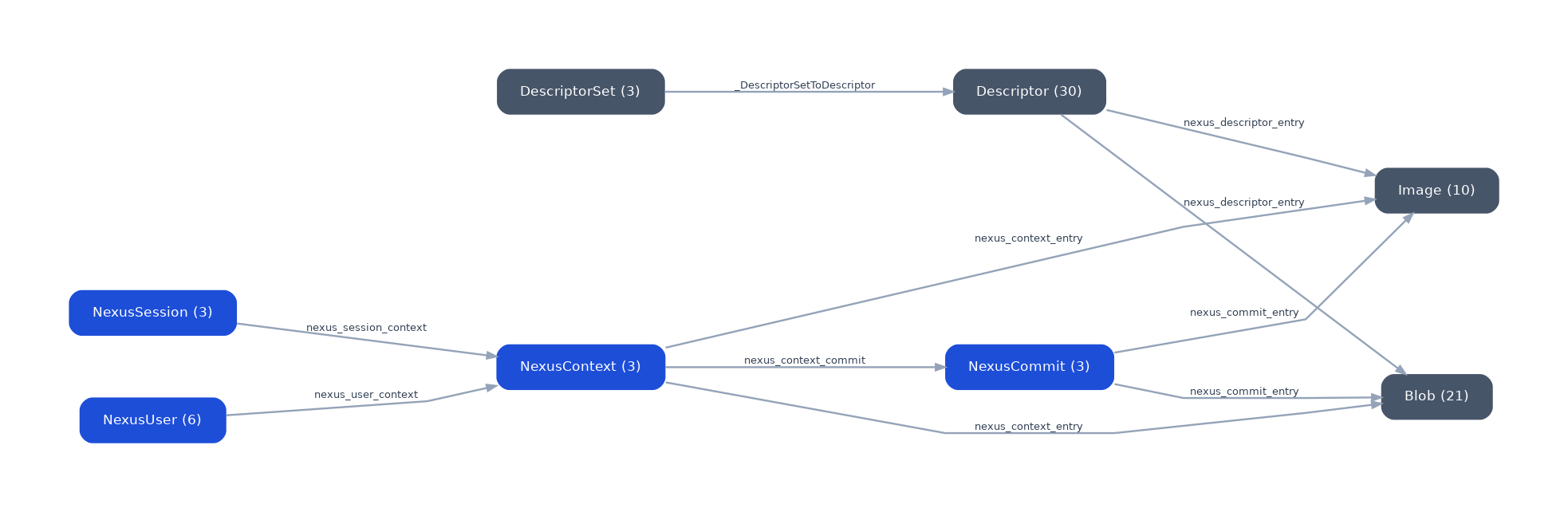
The graph below shows the schema as it appears in ApertureDB after a commit. Blue nodes are aperture-nexus entities, slate nodes are ApertureDB native storage primitives:
DescriptorSets
ApertureDB requires a DescriptorSet before any vectors can be
stored or searched. aperture-nexus creates and manages DescriptorSets
automatically based on the embedding_model name. Each unique model
name gets its own DescriptorSet.
This means:
- process_and_commit() requires at least one model configured in
aperture_nexus.json
- Pre-computed embeddings passed via
info.log(embedding=..., embedding_model="...") also require an
existing or new DescriptorSet
- Mixing models across calls is supported; each gets its own set
ApertureDB Web UI
ApertureDB ships with its own web UI at http://localhost:8087 (when
running via docker compose up -d or the demo). It shows raw ApertureDB objects
(Entities, Connections, Images, Videos, Descriptors), not
aperture-nexus concepts. It is useful for:
- Verifying that aperture-nexus is storing data correctly
- Debugging schema issues
- Inspecting DescriptorSets and their dimensions
A higher-level aperture-nexus UI showing sessions, contexts, memories, and search results is planned for a future release.
Knowledge Graph
Contexts can be connected to one another with named relationships
using memory.connect(). This adds a nexus_link edge between two
NexusContext entities and builds a traversable knowledge graph on
top of ApertureDB's Connection primitive.
memory.connect(source=ctx_q1, target=ctx_q2, relationship="follows")
memory.connect(
    source=ctx_id_1,
    target=ctx_id_2,
    relationship="related_to",
)
Memory-to-memory (commit-to-commit, blob-to-blob) linking is not part
of v1. To associate specific memories, link the NexusContext
entities that authored them; the automatic
nexus_context_commit and nexus_commit_entry edges then let a
traversal reach the individual memories from either side.
Graph traversal in memory.search() (via max_hops and relationship
filters) is planned for a future release. The underlying ApertureDB
Connection objects are created now and will be queryable once
traversal is implemented.
Security Model
- No root required: all paths and ports are user-accessible
- Credentials via environment:
APERTUREDB_KEYorAPERTUREDB_JSON; never hardcoded in config or source - Permission enforcement: all operations check the caller's
Principal; restrictions on aContextaffect what it can read and write - UI local by default: the aperture-nexus UI binds to
127.0.0.1; network access requires an explicitapi_keyset viaAPERTURE_NEXUS_UI_API_KEY